

A crowded waiting room does not always mean your clinic has too many patients. It may mean your queue management needs improvement.
Repeated patient queries, late arrivals, walk-ins, and doctor delays can put pressure on reception staff and increase waiting times.
Manual queues may work for small clinics, but managing them becomes harder as patient numbers grow.
Automated queue management helps organise patient flow through digital tokens, live updates, and display screens.
But does your clinic really need it? Let's compare both approaches to help you decide.
What Is Manual Patient Queue Management?
Manual patient queue management uses registers, token slips, or Excel sheets to organise patients and manage their turn. The receptionist usually handles the process.
How a manual queue works
- Staff write the patient's details in a register.
- A token number is assigned.
- The receptionist calls patients in sequence.
- Staff update the register when a patient enters.
- The next patient is called after the consultation.
-
Step 1Write the nameThe desk writes each patient in a register.

-
Step 2Give a numberThe patient gets a paper token, or is told a number.

-
Step 3Wait and askThe patient sits. Then the patient comes back to ask.
 How long now?
-
Step 4Call outA staff member calls the next name or number.
 Token 14!
For a small clinic with one doctor and fewer than 20 patients, this method may be enough.
However, the process becomes harder when the receptionist handles appointments, billing, phone calls, and patient enquiries at the same time.
The Benefits of Keeping It Manual
- Low cost: Requires only a register, token slips, or a whiteboard.
- Works offline: Staff can issue tokens without an internet connection.
- Easy to use: Requires little training for reception staff.
- Suitable for small clinics: Works well when patient numbers are low and predictable.
The Hidden Costs of Manual Queue Management
- Higher reception workload: Staff spend more time managing tokens, registrations, and patient queries.
- Difficulty handling more patients: Walk-ins, online bookings, and priority cases make queues harder to manage.
- Unfair queues and errors: Manual adjustments can lead to missed turns, duplicate tokens, and inconsistent queue order.
- Poor patient experience: Unclear waiting times and lack of updates can frustrate patients.
- Missed appointment follow-ups: Staff must manually confirm appointments and send reminders.
- Poor doctor coordination: Managing multiple doctors, delays, and separate queues requires extra effort.
- Limited visibility: Difficult to track patient arrival times, waiting times, peak hours, reasons for delays, and doctor-wise workload.
Where a busy day leaks money
With a manual queue, patients and money drain away at six points on every busy day.
-
Patients leave Nobody can say how long the wait is. Some leave without seeing the doctor. Their phone shows their place in the line and the wait. They can step out and come back in time. Lost: the visit feeFix: live wait on the phone
-
No-shows No reminder and no news of the line. Some patients forget or give up. A reminder goes out before each booked visit. Lost: an empty slotFix: automatic reminders
-
Missed follow-ups Nobody reminds the patient to come back. A booked follow-up gets its reminder too. Lost: the repeat visitFix: follow-up reminders
-
Desk overload Staff answer "how long?" all day, between bills and phone calls. Patients see the line on the TV and on their phone. Lost: desk timeFix: fewer questions
-
Money slips A wrong entry in the money book is found late, or never. Payment audit flags entries to check, staff by staff. Lost: cashFix: payment audit
-
No numbers No record of waits, busy hours or patients who did not come. Reports show patients seen and absent, waits and the busiest session. Lost: good decisionsFix: daily reports
Six leaks, on every busy dayEach leak has a fix
The trouble starts when the clinic gets busy. The whole line depends on one person.
Here is what that looks like in a normal day:
When Is Manual Queue Management Suitable for Your Clinic?
Manual management may be suitable when:
- You have one doctor and 20–30 patients a day.
- Patient flow is predictable, with few walk-ins.
- Patients rarely ask about their queue status.
- The reception staff can manage the queue easily.
- Patients are happy with waiting times and communication.
- Automated appointment reminders are not needed.
There is no reason to automate a process that is already simple, reliable, and manageable.
What Is Automated Patient Queue Management?
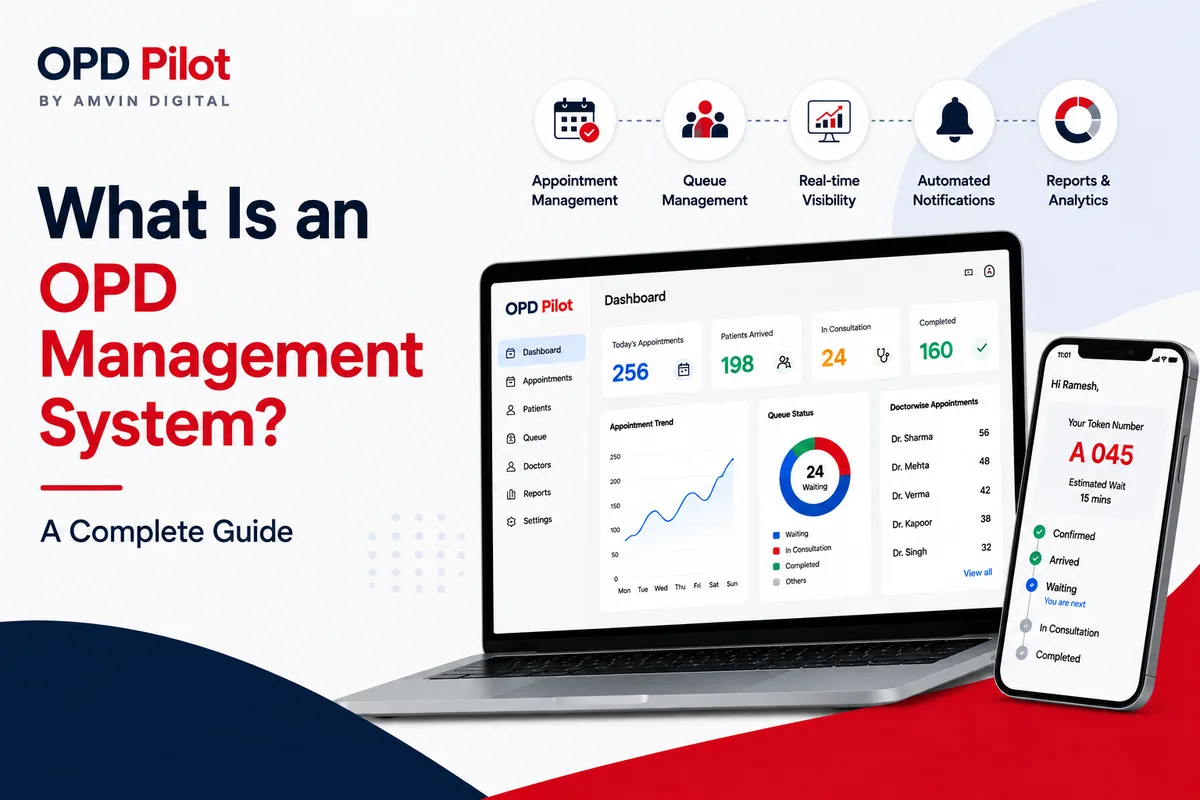
Automated patient queue management uses software to manage patient queues digitally. It assigns tokens, tracks patient positions, and updates patients and clinic staff about queue progress.
This reduces the need for manual token management and repeated verbal updates at the reception desk.
How an automated queue works
- Patient books an appointment and gets a token.
- Patient receives a link to check their queue status.
- Patient scans a QR code to check in.
- The system arranges the queue in real-time based on clinic rules.
- The TV and patient's phone show live queue updates.
- The system calls the patient when it is their turn.
- After each consultation, the next patient is called.
The goal is not to replace staff. The goal is to improve staff productivity by reducing repetitive tasks and making queue management easier.
How Automated Queue Management Works in Your Clinic
At the desk: Attendance Board

In the waiting room: TV

Nisha's phone

What the Patient Sees and Experiences
Nisha's morning




The Benefits of an Automated Queue System
- Organised patient flow: Assigns tokens and maintains the queue based on clinic rules.
- Fairer queue handling: Reduces manual errors and maintains a consistent queue order.
- Handles more patients: Makes busy OPD queues easier to manage.
- Live patient updates: Patients can check their token, queue position, and estimated waiting time.
- Automated reminders and follow-ups: Sends appointment confirmations, reminders, and patient updates.
- Less reception workload: Reduces repetitive questions, manual updates, and announcements.
- Better doctor coordination: Manage separate queues and doctor availability from one place.
- Useful reports: Track patient arrival times, waiting times, peak hours, and queue activity.
At 9 pm, what do you know about today?

- Patients seenCount by hand
- Did not come?
- Average wait?
- Busiest sessionA guess
- Money receivedCount the cash
- Money mistakes?
- Why patients waited?
What to Consider Before Automation
- Software and equipment costs: May require a subscription, computer, TV display, or other devices.
- Staff training: Employees need time to learn the system.
- Patient support: Some patients may need help with QR check-in or live queue updates.
How Automation Helps Queue Management?
| Clinic Challenge | How Automation Helps |
|---|---|
| High Patient Volume | Digital tokens, live tracking, and smart queue rules help manage large queues smoothly. |
| Late Arrivals and Priority Patients | Custom queue rules manage on-time, late, very late, and priority patients. |
| Crowded Reception | TV displays and voice announcements help manage the waiting area. |
| Multiple Doctors | Doctor-wise queues and availability status simplify coordination. |
| Communication Gaps | WhatsApp reminders, notifications, and real-time updates keep patients informed in their languages. |
| Queue Delays & Errors | Automatic queue progression reduces manual errors and missed turns. |
| Limited Reporting | Digital reports provide visibility into patient flow and waiting times. |
| Reception Overload | Automated updates and queue handling reduce repetitive staff tasks. |
Does Your Clinic Really Need Automated Queue Management?
Not every clinic needs a full digital queue system. But if manual queue management is creating repeated delays, staff workload, or patient complaints, it may be time to consider automation.
Use this Clinic queue assessment to assess your clinic.
0 of 7
A manual queue can still work well for you.
What patients who leave cost you
The page works it out as you type.
Fees lost every month
₹26,000
Fees lost every year
₹3,12,000
That is 52 visits a month. A patient who never comes back costs more than one visit.
Manual vs Automated Patient Queue Management: What Changes for Your Clinic?
| What to compare | Manual queue management | Automated queue management |
|---|---|---|
| Patient registration and tokens | Staff enter patient details and issue tokens manually. | Software records check-ins and generates tokens digitally. |
| Queue order and fairness | Staff manage the order manually, which can lead to confusion during busy hours. | The system follows defined queue rules to help maintain a fair and consistent order. |
| Managing high patient volume | Managing many patients becomes difficult, especially during peak hours. | Staff can track and manage larger queues more easily. |
| Patient updates | Patients ask reception staff when their turn will come. | Patients can check queue updates on a display or their phones. |
| Managing multiple doctors | Staff may need separate registers and frequent coordination. | A central dashboard shows doctor-wise queues and availability. |
| Reception workload | Staff spend time assigning tokens, answering questions, and making announcements. | Digital tracking reduces repetitive queue-related work. |
| Waiting time and reports | Waiting times and busy hours are difficult to track without manual calculations. | Digital records help clinic owners review waiting times, peak hours, and queue activity. |
| Setup and maintenance | Requires basic registers, stationery, and staff coordination. | Requires software, suitable devices, internet access, and staff training. |
What Does OPD Pilot’s Smart Queue Management System Offer?
OPD Pilot’s Smart Queue does more than assign tokens. It helps clinics manage patient flow, coordinate doctors, keep patients informed, handle payments, and track daily OPD activity through one connected system.
Here’s what it supports:
1. Digital Tokens
Automatically assign digital tokens to patients and organise the queue.
2. QR Code Check-in
Allow patients to check in by scanning a QR code, reducing manual work at the reception desk.
3. Smart Queue Rules
Manage on-time, late, and very late patients through predefined queue rules. Set different priority rules to maintain an organised and fair patient flow.
4. Doctor-wise TV Displays
Display current and upcoming tokens for multiple doctors, helping patients know which token is being called and where to go.
5. Voice Announcements
Announce patient token numbers in English, Hindi, or Bengali, so patients can hear when it is their turn.
6. Live Queue Tracking
Let patients check their queue status on their phones, including:
- Their current queue position
- The number of patients ahead of them
- Their estimated waiting time
7. Doctor Availability Status
Show whether a doctor is available, on a break, or has not yet arrived. This helps staff and patients understand the doctor's current status.
8. Automatic Queue Progression
Move the queue forward as consultations are completed, keeping the patient flow updated.
9. Patient Notifications
Send timely updates such as "You are next" and "Please go to the doctor's chamber" so patients know when to proceed.
10. WhatsApp Notifications
Keep patients informed through WhatsApp updates about appointments and their queue status.
11. Payment Rules and Automatic Charges
Set different fees for new patients, returning patients, and free follow-ups. The system automatically applies the correct charges based on your clinic's rules.
12. Payment Audits and Staff-wise Tracking
Track every payment with patient and staff details. See how much each staff member collects and spot unusual transactions through payment audit checks.
One Connected OPD Workflow
OPD Pilot also connects Smart Queue with appointment booking, patient records, prescriptions, and payments. This means clinics can manage more of the patient journey through one connected workflow instead of handling each process separately.
From appointment booking and check-in to queue management, consultation, prescriptions, and payment, the system helps bring everyday OPD operations together.
Six separate tools, or one system
Six separate tools. Staff copy the same patient from one to the next.
- #18 NishaDiaryBookingPhone calls written downOnline or at the desk
- #18 NishaToken slipsCheck-inPaper slips at the deskQR code or one press
- #18 NishaRegisterQueueOne person keeps the lineLive on the TV and phones
- #18 NishaPaper filesConsultationOld visits found by handPast visits on screen
- #18 NishaPrescription padPrescriptionWritten by handPrinted, and on the patient's phone
- #18 NishaCash bookPaymentTotals added up at nightEvery payment checked
Six places to look for one patientOne patient, one record, from booking to payment
Explore OPD Pilot to see how these workflows can work together in your clinic.
Frequently Asked Questions
It can reduce avoidable delays caused by manual registration, poor communication, and queue coordination. However, total waiting time also depends on doctor availability, consultation duration, staffing, and patient arrivals.
They should still be able to check in through reception. Staff-assisted registration and physical waiting-room displays are important for accessibility.
A suitable system can maintain separate doctor-wise queues through one dashboard. This helps reception staff monitor patient movement across consultation rooms.
Yes. The system combines all patient entries into one queue and automatically adjusts the order in real time based on your clinic's rules. Patients and staff get live queue updates as the queue moves.
No. Patients can check their queue status on their phones. However, a TV display helps patients who do not use smartphones see which token is being called.
Your clinic can be up and running in just 2–4 days!
We make sure your staff feel comfortable using the system with personal guidance and hands-on training.
- Personal one-to-one training: We guide your staff step by step through live screen-sharing sessions. We are also available during clinic hours to help them handle real tasks and solve any difficulties.
- AI-guided training: Amy, the AI assistant, helps staff learn and takes a short test to check their understanding.
- Easy to use: With one-click actions and voice commands, staff can ask Amy to perform tasks instead of navigating multiple screens.
Your team gets personal support, hands-on training, and a smooth start—without a steep learning curve!
The most important feature is real-time queue management that keeps patients, staff, and doctors in sync. A good system should do more than generate tokens. It should help clinics manage the entire patient flow, from check-in to consultation.
Look for features such as:
- Smart token management: Organises appointments, walk-ins, and priority patients based on clinic rules.
- Live queue updates: Lets patients and staff track queue status and waiting times in real time.
- Doctor-wise queue management: Helps manage multiple doctors and their availability.
- Patient notifications: Sends appointment reminders and queue updates to reduce unnecessary enquiries.
- Voice announcements: Announces token numbers when it is a patient's turn, so patients know when to proceed.
- AI receptionist: Answers patient queries through voice chat, helping patients get information without repeatedly contacting the reception desk.
- Reports and staff accountability: Tracks patient flow, waiting times, and peak hours, while showing how staff manage the queue.
Ultimately, choose a system that makes daily OPD operations easier, reduces manual work, and gives patients a clearer idea of when they will be seen.
Final Verdict: Should Your Clinic Automate Patient Queue Management?
Manual queue management may work for small clinics with simple workflows.
But clinics with large patient volumes and complex workflows need better systems. Managing appointments, queues, billing, pharmacy, and lab services manually can be difficult.
Automation helps bring these tasks together. It reduces manual work and keeps daily operations organised.
Ask yourself:
Is your current system making work easier, or adding more work for your team?
Choose a system that fits your clinic's needs and makes things simpler for both patients and staff.